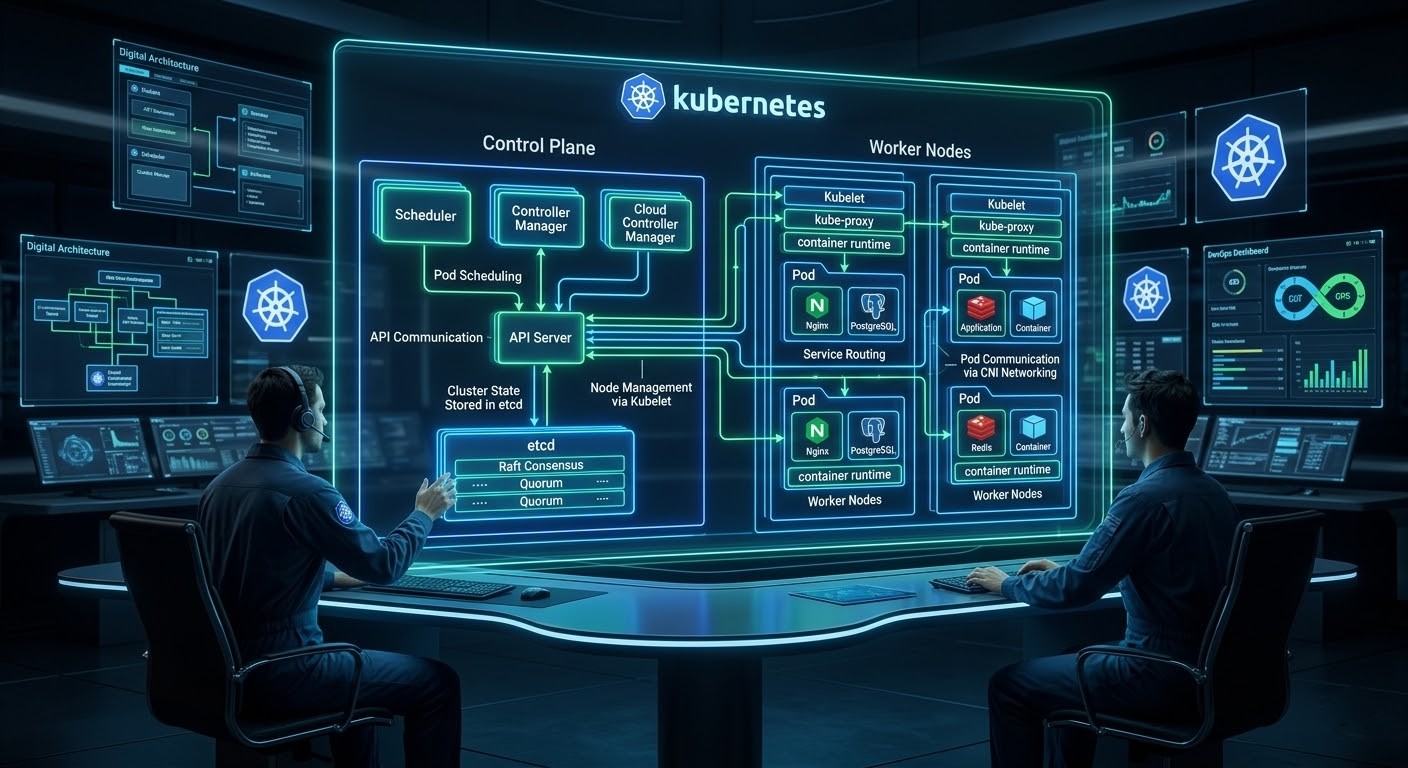
Let's dive into a short explanation of Kubernetes. To understand Kubernetes architecture, we first have to understand the core concept it relies on.
What is Orchestration
In computing, orchestration is the automated management, coordination, and configuration of complex computer systems and services. It's about making all the different parts of an application work together as a single, cohesive unit.
The Conductor Analogy 🎶
- Think of a symphony orchestra. You have many different musicians (violins, cellos, trumpets), each a skilled expert at their instrument.
- These are your individual containers or services. Without a conductor, if they all just started playing, it would be chaos.
- The orchestration tool is the conductor. The conductor doesn't play an instrument but instead:
- Tells everyone when to start and stop (deployment and scheduling).
- Controls the volume and tempo (scaling and resource management).
- Brings in different sections when needed (service discovery and load balancing).
- Notices if a musician is playing out of tune and corrects them (self-healing and monitoring).
The conductor ensures that dozens of individual parts work together to create a beautiful, single piece of music - your application.
Now let's See the Kubernetes (K8s) Architecture Overview
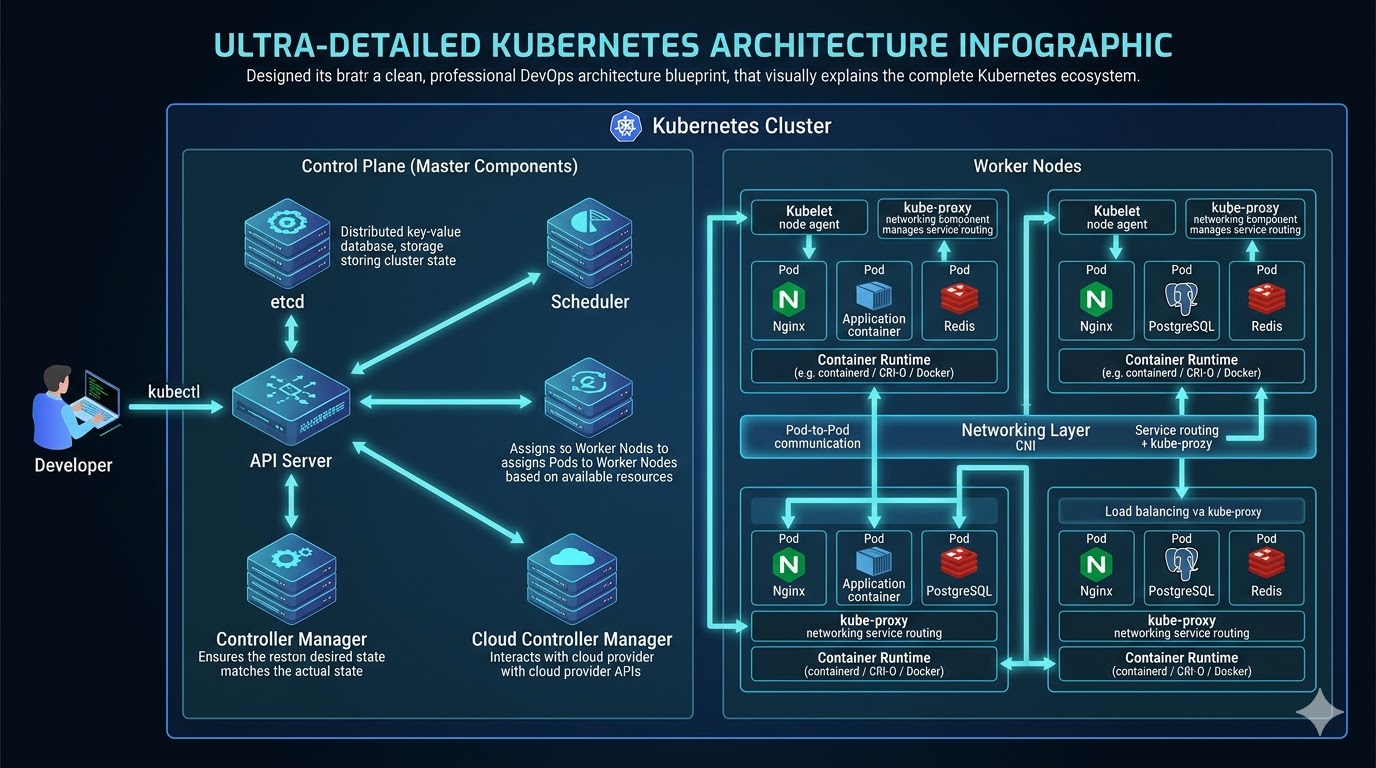
Now Let's Understand The (Control Plane) And It's Components
What is a Control Plane? The Control Plane is the decision-making body. In an enterprise software company, this is your Upper Management and Operations Center. It doesn't write the code (run the containers), but it manages everyone who does.
What is API Server (API Gateway)?
- The front door to the Kubernetes cluster. All communication (internal and external) goes through here. It is a RESTful API endpoint that processes every REST request (POST, PUT, DELETE, GET) within the cluster. This is the central communication hub of your entire cluster. It is the absolute core where the control plane and worker nodes talk to each other; without it, nothing in the system could connect or communicate. It is the central management hub.
- How it works: When you run a command like kubectl apply, you are sending a JSON/YAML payload to this API. It authenticates the request (checks your identity), validates the payload (checks if the code is correct), and prepares it for processing. It is the only component that directly talks to the database
What is etcd (Database)?
Etcd is a consistent, distributed Key-Value Store (Database). It is simply the cluster's memory bank a highly reliable database where the system securely stores all of its essential configuration settings and current states. It stores the entire configuration data and the status of the cluster.How it works: It uses the Raft Consensus Algorithm to ensure data consistency across multiple machines. Once the API Server accepts your request, it writes this new "Desired State" into etcd. If this database is lost, the cluster is lost.
What is Scheduler?
In resource management, we need an algorithm to decide efficient allocation. It acts as the cluster's smart matchmaker. Basically the Scheduler is a filtering algorithm. It watches for new workloads (Pods) that have been created in the database but not yet assigned to a machine (Node).How it works: When a new project comes in (a new Pod), the Resource Manager looks at the available teams (Worker Nodes). They check capacity: "Team A (Node 1) is overworked (High CPU usage). Team B (Node 2) has free capacity. I will assign this project to Team B.". When Pods need a new home, the scheduler looks at all available worker nodes, checks how much capacity they have left, and then assigns the Pods to the most appropriate and efficient spot. It reads the resource requirements of your application (e.g., "Needs 2GB RAM") and filters the available Worker Nodes. It selects the node with the best available capacity and updates the API Server with this assignment.
Now what is Controller Manager?
Runs controller processes. It logically manages the state of the cluster. Think of it as the cluster's watchful supervisor. It constantly oversees the condition of the control plane and worker nodes, making sure essential parts—like the scheduler, API server, and database—are always running in a healthy, working state. It is basically a background process that runs continuous infinite loops. Its only job is to compare the Desired State (from etcd) with the Actual State (what is currently running).How it works: If you define "3 Replicas" of a specific software service, but the Controller sees only "2 Replicas" running (perhaps one crashed), it immediately triggers a command to create a new one. It essentially "self-heals" the software deployments.
Now It's Time To Understand (Worker Node) And It's Components
What are Worker Nodes? These are the machines where your applications actually run basically server for application runtime. So basically an agent that runs on each node in the cluster. It ensures that containers are running in a Pod.
Once your nodes are provisioned, managing the underlying host storage efficiently is critical. Check out:
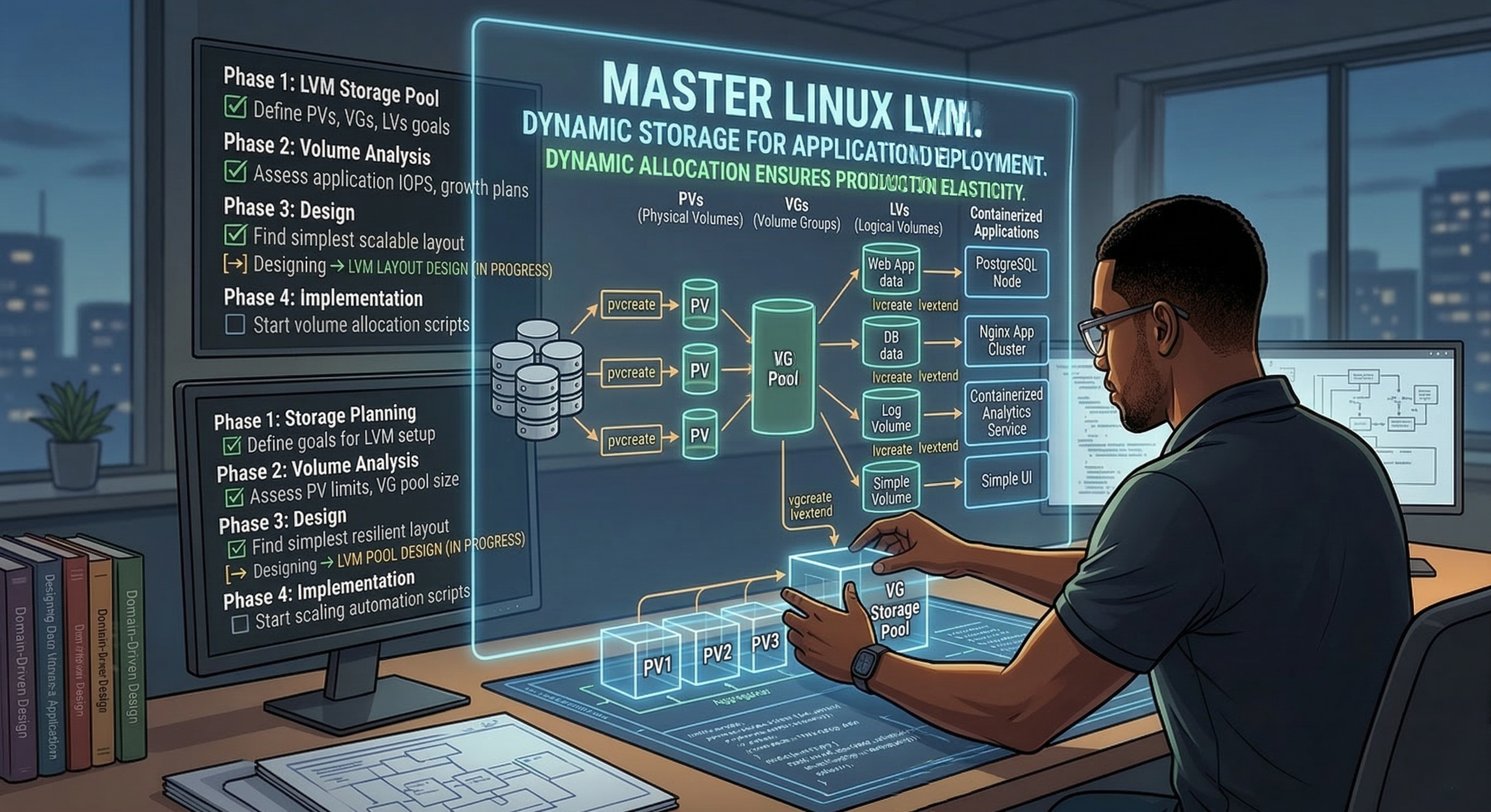
Master Linux LVM: Dynamic Storage for Application Deployment.What is Kubelet?
- Kubelet is the node agent of Kubernetes. It is essentially your on-site manager. It is the process responsible for making sure containers defined in a PodSpec are actually running on that node. In practical terms, kubelet acts as the executor of instructions coming from the Kubernetes control plane. Core responsibility: Ensure the pods assigned to its node are created, running, and healthy. It is responsible for handling all Pod-related tasks, like keeping a close eye on their daily health and ensuring their overall conditions run smoothly on the node. So kubelet is not about networking or exposing apps. It is about running and maintaining containers on the worker node.
- How it works: It constantly polls the API Server asking, "Do you have any work for my node?". When the API Server (via the Scheduler) assigns a task to that node, the Kubelet accepts the specification and interacts with the underlying hardware.
What is Kube-proxy?
- A network proxy that maintains network rules on each node. It acts like a helpful traffic cop, securely routing network requests so your applications are successfully made visible across the internet to your clients. Basically services need stable IP addresses to communicate, regardless of where they are running.
- How it works: It manages the IP Tables (network routing rules) on the machine. It ensures that traffic sent to a virtual Service IP is correctly routed to the specific backend Pod (application instance) running on that machine.
What does mean by the Container Runtime?
- The software responsible for actually running the binary application (e.g., Docker Engine, containerd, CRI-O).
- How it works: The Kubelet instructs the Container Runtime to pull the specific Container Image (the software package) from a registry and start the process.
What is Pods?
- What they are: In Kubernetes, a Pod is the smallest and simplest unit that runs your application. Think of a Pod as a wrapper for one or more containers (usually one container). Simple example: If your app is a Docker container, Kubernetes does not run the container directly. It runs inside a Pod.
- How they work: All containers inside a Pod run on the same machine (node). They share the same IP address and ports. They share storage (if defined). So in short: Pod = Smallest deployable unit in Kubernetes that holds your application container(s).
Now Let's Dive Into Kubernetes Networking?
CNI (Container Network Interface)
CNI in Kubernetes (Container Network Interface) is the networking standard used to connect containers and pods to a network. In simple terms, it defines how pods communicate with each other and with the outside world inside a Kubernetes cluster. Short definition: CNI in Kubernetes is a standard interface and plugin system that configures networking for pods, assigning IP addresses and enabling communication across the cluster.
Core Idea: Kubernetes itself does not implement networking logic. Instead, it delegates networking to CNI plugins. These plugins configure the network whenever a pod is created or deleted.
- The flow looks like this: Kubernetes → Container Runtime → CNI Plugin → Network Setup.
- When a new pod starts, Kubernetes schedules the pod on a node.The container runtime (containerd / CRI-O) calls the CNI plugin.
- The plugin assigns an IP address, network routes, and connectivity with other pods. This ensures that pods can communicate seamlessly across nodes.
Kubernetes Networking Requirements: Kubernetes networking follows three important rules:
- Every Pod gets its own IP address.
- Pods can communicate with other pods without NAT.
- Nodes and pods can communicate freely.
- CNI plugins are responsible for implementing these rules.
Popular CNI Plugins: Different environments use different CNI implementations depending on performance and networking features. Some widely used options include:
- Calico – High-performance networking with built-in network policies. Very common in production clusters.
- Flannel – Simple overlay networking, beginner-friendly.
- Weave Net – Easy to deploy with automatic mesh networking.
- Cilium – Advanced networking powered by eBPF, strong security and observability.
- AWS VPC CNI – Used in EKS, assigns AWS VPC IPs directly to pods.
- Each plugin handles IP allocation, routing, and security policies differently.
Example (How CNI Works in Practice):
- Suppose you deploy a pod: kubectl run nginx --image=nginx.
- Behind the scenes: Pod gets scheduled to a node. Container runtime creates the container. Kubernetes calls the CNI plugin.
- The plugin creates a network interface, assigns an IP address, and configures routing rules.
- Now that pod can communicate with other pods, services, and external networks.
Where CNI Fits in Kubernetes Architecture: From a DevOps architecture perspective:
- Pod
- Network Namespace
- CNI Plugin
- Node Networking
- Cluster Networking
- So essentially, CNI is the networking layer that makes pod-to-pod communication possible in Kubernetes clusters.
What is Pod Communication?
If you're learning DevOps and Kubernetes, the next critical concept after CNI is understanding Pod Networking vs Service Networking vs Ingress. I can break that down clearly as well.
Now It's Time To Learn About Distributed Systems Concepts
Raft Consensus
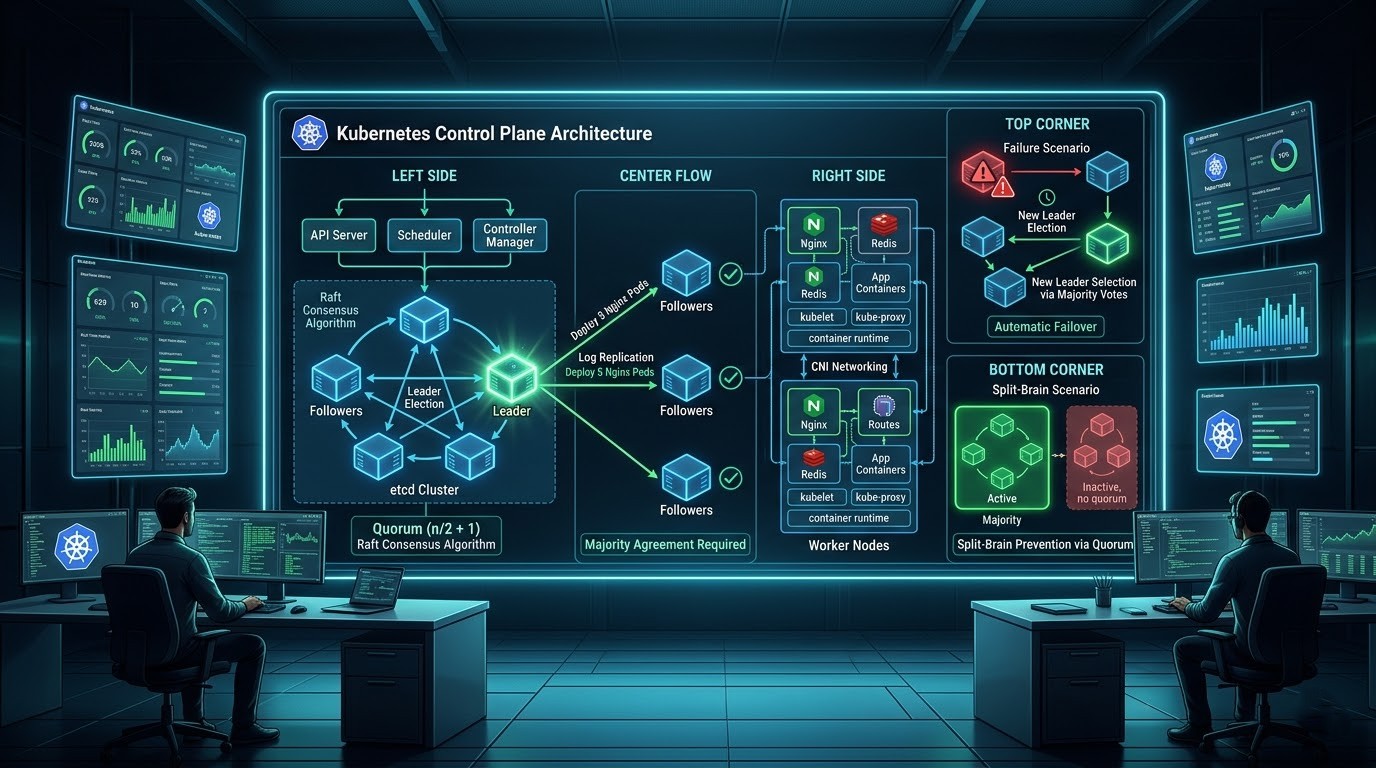
What is the raft consensus group?. Raft is a set of rules (an algorithm) that allows a group of computers to agree on information and keep it consistent, even if some of the computers fail. Its main goal is to be easier to understand than other consensus algorithms. It works by first electing a "leader" from the group, and that leader is then responsible for managing all changes.
Real-World Analogy: A Committee Choosing a Project Leader Imagine a committee of five people who need to decide on a single project leader for a new initiative. They need a reliable way to make this decision and ensure everyone knows who the chosen leader is, even if some members are temporarily out of the office.
- Leader Election: Initially, everyone is a regular committee member (Follower). After a short, random amount of time, one member, Alice, decides to run for chairperson (Candidate). She sends a message to everyone: "Vote for me.". The other members receive the message. Since they haven't voted for anyone else yet, they vote for Alice and send back a "Yes" vote. Once Alice receives a "Yes" from a majority of the committee (e.g., 3 out of 5 votes), she becomes the official chairperson (Leader). She is now the only one who can make official decisions.
- Making a Decision (Log Replication): Now, a decision needs to be made: "Our project leader will be Bob.". The Leader, Alice, is the only one who can propose this. She writes it down in her notebook (her log) and sends the proposal to all the other committee members (the Followers). The Followers receive the proposal. They write it in their own notebooks and send an "Acknowledged" message back to Alice.
- Reaching Agreement (Consensus): Once Alice receives an "Acknowledged" message from a majority of the members, she knows the decision is safely recorded. She "commits" the decision, making it final. She then informs the entire committee that the decision is final and "Bob is the project leader.". This process ensures that a single, consistent decision is made and recorded by a majority of the group, preventing confusion and chaos.
Now what does mean by the Quorum?
What is Quorum and max failure?. The Core Problem: How a Group Makes a Decision.
Imagine we have a group of "manager" servers. Their job is to agree on the state of our application. If we tell them, "Run 5 copies of our website," all of them need to agree that the correct number is 5. If one server thinks it's 5, another thinks it's 3, and a third is offline, how does the group know what the truth is?. They need a voting system. This voting system is called Quorum.
Quorum: The minimum number of "yes" votes required to pass a decision. For computers, the rule is simple: you need a majority.
What is Failure Tolerance?
The Math of Fault Tolerance (Explained with Pizza 🍕). Let's imagine our manager nodes are deciding on a pizza topping. A decision is only final if a majority (the quorum) agrees.
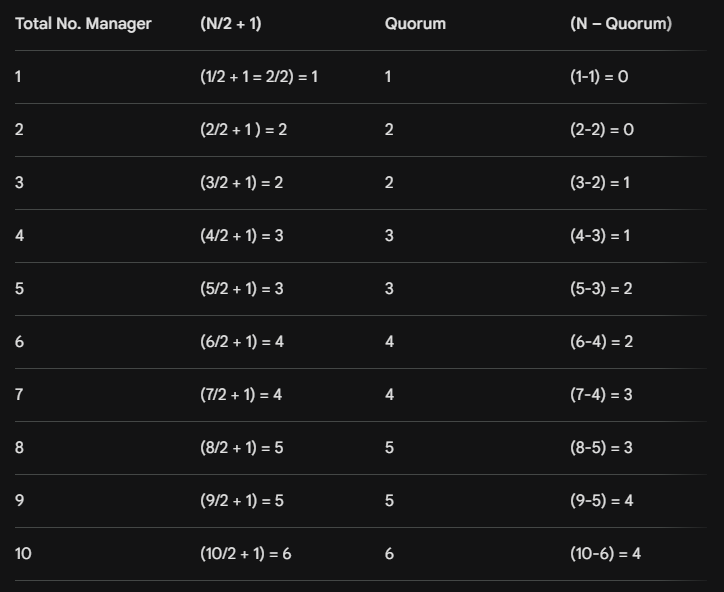
The Magic Formula: To find the majority (quorum), the formula is (n / 2) + 1, where n is the total number of managers. Let's see why odd numbers are better here.
Scenario 1: 3 Managers (An Odd Number)
- Total Managers (n): 3
- Quorum Needed: (3 / 2) + 1 = 1.5 + 1 = 2.5. Since we can't have half a vote, we round up. A majority of 3 is 2. Quorum Needed: 2 votes.
- How many can we lose? If one manager goes offline for lunch, we still have 2 managers left. They can still vote and form a majority (2 out of 2 votes). The system keeps working. Max Failures Tolerated: 1.
Scenario 2: 4 Managers (An Even Number)
- Total Managers (n): 4
- Quorum Needed: (4 / 2) + 1 = 2 + 1 = 3 votes.
- How many can we lose? If one manager goes offline, we have 3 managers left. They can still vote and form a majority (3 out of 3 votes). The system keeps working. Max Failures Tolerated: 1.
- Look at that! We paid for a whole extra server (going from 3 to 4 managers), but we didn't gain any extra safety. We can still only tolerate one failure. This is why adding just one server to an odd-numbered cluster is often a waste of money and resources. Let's do one more.
Scenario 3: 5 Managers (An Odd Number)
- Total Managers (n): 5
- Quorum Needed: (5 / 2) + 1 = 2.5 + 1 = 3 votes.
- How many can we lose? We can lose two managers and still have 3 left to vote and form a majority. Max Failures Tolerated: 2.
- This is the "why". You only gain more fault tolerance when you reach the next odd number. Let’s See the example in table.
- Example: 1 = 1 / 2 + 1/1 = 1 + 2 / 2 = 3 / 2 = 2 / 3 = 1 = 1 - 1 = 0.
Let’s See the example in table: -
Example: 1 = 1 / 2 + 1/1 = 1 + 2 / 2 = 3 / 2 = 2 / 3 = 1 = 1 - 1 = 0
Now it's time learn about Split-Brain Problem?
What is "Split-Brain"? (The Catastrophic Failure)? & why an odd number!. This is the most important reason we use odd numbers. A "split-brain" is a state where the cluster is so confused that it stops working to avoid destroying itself.
Analogy: Two Project Managers Imagine your company has a team of 4 project managers. A network cable is accidentally cut, splitting the office into two rooms. Room A has 2 managers. Room B has 2 managers. They can't talk to each other.
- The managers in Room A think the others are gone. They hold a vote. They have 2 out of 2 votes, so they elect a new leader and start giving instructions to the engineers.
- The managers in Room B do the exact same thing. They elect their own leader and start giving different instructions.
Now you have two "brains" trying to control one "body" (your application). The engineers are getting conflicting commands. This is chaos. This is a split-brain. The result is a catastrophic failure state because the system is inconsistent and can't be trusted.
How an Odd Number Prevents This? Now, imagine your company has 5 project managers. The network cable is cut again. No matter how you split them, one room will have a majority (3) and the other will have a minority (2).
- The group with 3 managers has the quorum. They can elect a leader and continue working normally.
The group with 2 managers does not have the quorum. Their rules say, "We are in the minority, so we must do nothing.". They will sit quietly until they can talk to the other group again.
There is only ever one brain in control. The system remains stable and consistent. That's why we always aim for an odd number of managers: to make sure a majority is always possible, even during a network failure.