In modern software engineering, static storage provisioning leads to application downtime. When deploying a production environment—whether hosting a high-traffic WordPress architecture, serving a Next.js application, or managing containerized workloads—storage demands fluctuate.
Logical Volume Management (LVM) provides the abstraction layer required to scale persistent storage (like database data directories) dynamically. Conversely, direct disk management is often reserved for ephemeral data, such as CI/CD caches or temporary build artifacts.
Prerequisites
To effectively execute the workflows detailed in this guide, you must have foundational knowledge in the following areas:
- AWS Infrastructure: Understanding how to provision and attach block storage (specifically Amazon Elastic Block Store / EBS) to EC2 compute instances.
- EBS Storage Management: Familiarity with block storage lifecycles, IOPS/throughput constraints, and modifying volume states (expanding disk size) via the AWS Console or AWS CLI.
- Linux Command Proficiency: Comfort navigating the Linux terminal, executing commands with sudo privileges, and understanding basic OS filesystem hierarchy and block device mapping.
1. Storage Discovery & Initialization
When attaching new block storage (e.g., AWS EBS volumes) to your server, you must first verify the OS recognizes the hardware before initializing it for the LVM subsystem.
# List all attached block devices and their current mount points
lsblk

# Enter the interactive LVM shell for batch command execution
lvm
- Deployment Context: Use lsblk immediately after provisioning a new cloud volume to identify the raw device path (e.g., /dev/xvdf) before assigning it to a database or application log directory.
2. Physical Volumes (PV): Preparing Block Storage
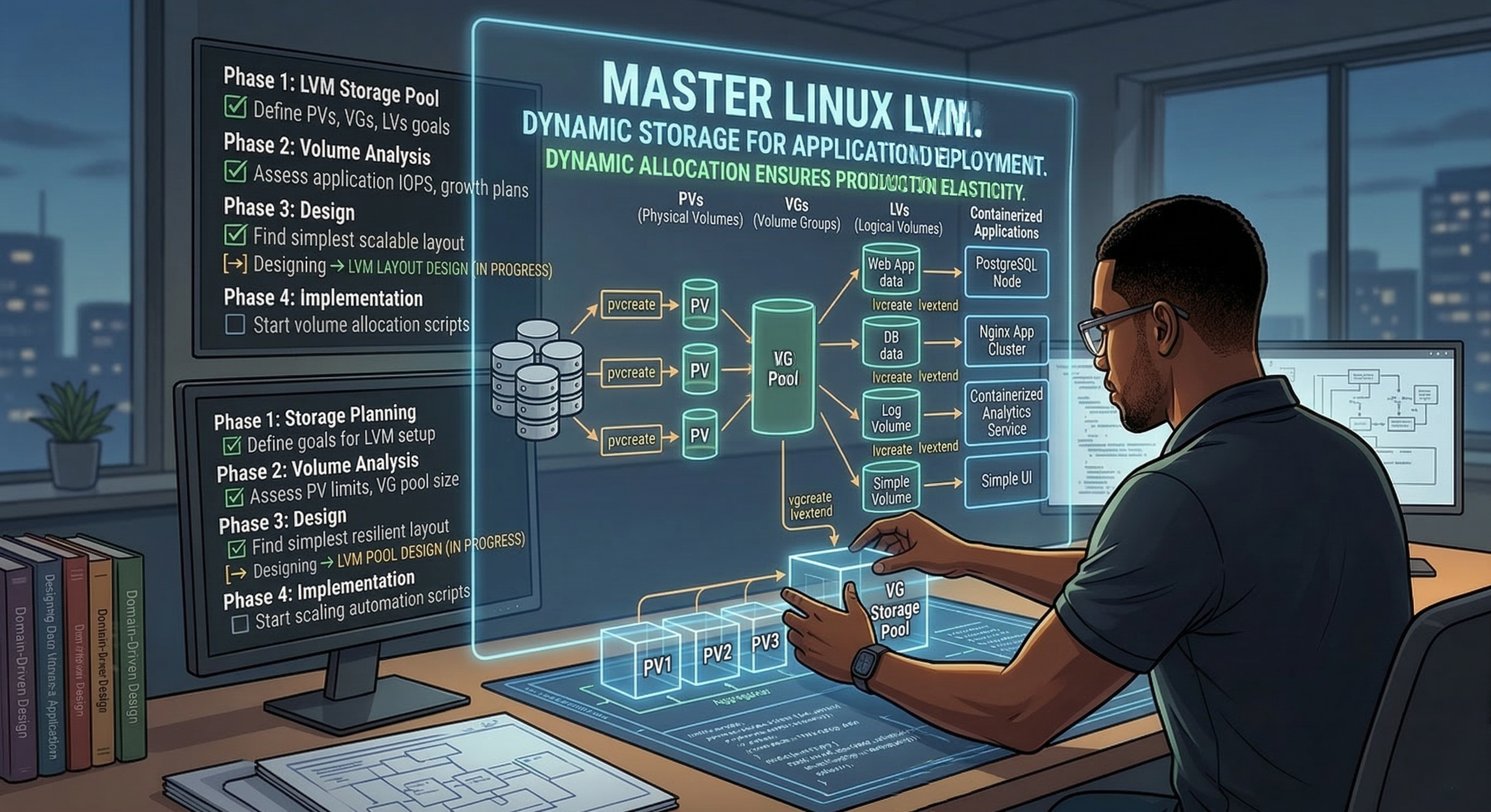
Raw block devices must be formatted with LVM metadata to become Physical Volumes. This step dictates which disks are allowed to participate in your dynamic storage pools.
# Initialize raw block devices for LVM use
pvcreate /dev/xvdf /dev/xvdg /dev/xvdh

# Display a concise summary of all physical volumes
pvs

# Display verbose metadata and allocation details for physical volumes
pvdisplay

# Wipe LVM metadata from physical disks
sudo pvremove /dev/xvdf /dev/xvdg
- Deployment Context: When setting up a new production server, you initialize the attached block storage using pvcreate. If a disk is failing or needs to be detached from the cloud instance and decommissioned, pvremove ensures the LVM metadata is securely wiped.
3. Volume Groups (VG): Creating the Storage Pool
Volume Groups aggregate multiple physical volumes into a single logical storage pool. This abstracts the underlying hardware boundaries.
# Aggregate physical volumes into a single named storage pool
vgcreate db_cluster_vg /dev/xvdf /dev/xvdg

# List volume groups and display available unallocated capacity
vgs

# Display verbose metadata for volume groups
vgdisplay

# Add newly attached physical volumes to expand the existing pool
vgextend db_cluster_vg /dev/xvdh

# Evict a physical volume from the storage pool
vgreduce db_cluster_vg /dev/xvdh

# Permanently delete an empty volume group
sudo vgremove db_cluster_vg
- Deployment Context: You might create a db_cluster_vg specifically for a PostgreSQL or MySQL backend supporting your application. If your application database grows rapidly, you can provision a new cloud volume, initialize it, and use vgextend to add capacity to the pool without taking the database offline.
4. Logical Volumes (LV): Provisioning Application Partitions
Logical Volumes are the mountable partitions carved from the Volume Group. These represent the actual file systems your applications interact with.
# Provision a dedicated 10GB logical volume from the storage pool
lvcreate -L 10G -n app_data db_cluster_vg

# List all logical volumes and their current sizes
lvs

# Display verbose configuration details of logical volumes
lvdisplay

# Dynamically extend the logical volume and resize the filesystem simultaneously
lvextend -r -L +5G /dev/db_cluster_vg/app_data

# Safely reduce the logical volume size (requires manual filesystem shrink first)
sudo lvreduce -L 5G /dev/db_cluster_vg/app_data

# Deactivate the logical volume to prevent access during maintenance
lvchange -an /dev/db_cluster_vg/app_data

# Forcefully remove a logical volume and return capacity to the pool
sudo lvremove -f /dev/db_cluster_vg/app_data
- Deployment Context: You use lvcreate to isolate storage, for example, creating one LV for /var/log/nginx and another for /var/lib/mysql. If your Next.js application experiences a surge in traffic and your database volume nears 90% capacity, executing lvextend -r allocates more space and expands the filesystem dynamically, ensuring zero application downtime.
5. Formatting, Mounting, and Diagnostics
LVs require a filesystem before they can securely store permanent application state.
# Format the logical volume with the ext4 filesystem
mkfs.ext4 /dev/db_cluster_vg/app_data

# Mount the filesystem to the application's data directory
mount /dev/db_cluster_vg/app_data /mnt/production_db

# Identify active processes holding open file descriptors on a mount point
sudo lsof /mnt/production_db

# Unmount the volume safely from the filesystem hierarchy
umount /mnt/production_db
- Deployment Context: mkfs.ext4 and mount make the persistent storage available to your deployment payload. If an automated deployment script fails to unmount a volume during an update, lsof is critical for identifying exactly which background worker or container daemon is locking the directory.
6. Ephemeral Storage: Direct Disk Management
Not all data requires the overhead and flexibility of LVM. Direct disk formatting is utilized for temporary, ephemeral workloads.
# Create the directory for the temporary mount point
mkdir /mnt/ci_cache

# Directly format the raw block device with ext4
mkfs -t ext4 /dev/xvdh

# Mount the ephemeral storage directly to the directory
mount /dev/xvdh /mnt/ci_cache
- Deployment Context: In a DevOps pipeline, you often need high I/O scratch space for temporary build artifacts, Docker image caching, or temporary log aggregation. Because this data does not need to be scaled dynamically and is destroyed upon instance termination, directly formatting and mounting the disk (mkfs without LVM) reduces operational complexity and maximizes raw I/O throughput for the temporary task.
Conclusion
In high-velocity deployment environments, storage architecture cannot be a scaling bottleneck. Logical Volume Management eliminates the rigidity of traditional disk partitioning, allowing you to treat block devices like AWS EBS volumes as a fluid resource pool. By abstracting the physical hardware, you can dynamically extend production databases, safely isolate volatile application logs, and rapidly provision ephemeral workloads without ever taking your systems offline. Mastering these core LVM commands ensures your foundational infrastructure remains as resilient, elastic, and scalable as the applications running on top of it.